Our browser-based voice-to-instrument tool uses pitch detection to analyze your vocal melody, extract the exact notes and timing, and play the performance back using high-quality instrument samples. Hum a tune, choose an instrument, and hear your melody played as that instrument in seconds. Everything runs inside your browser — nothing is uploaded to any server.
Hum, sing, or whistle a melody into your microphone. A clear, single-note melody works best.
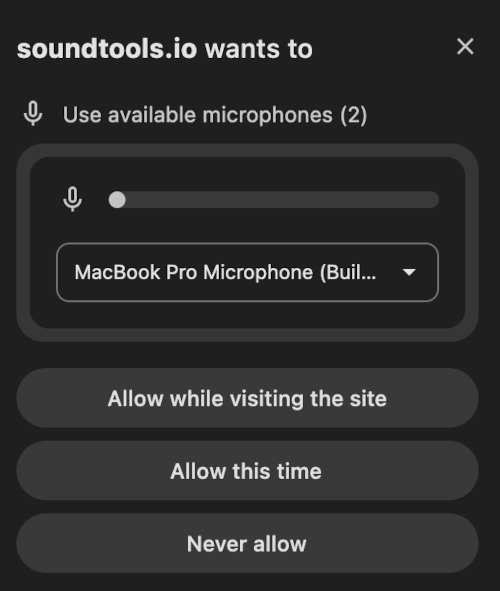
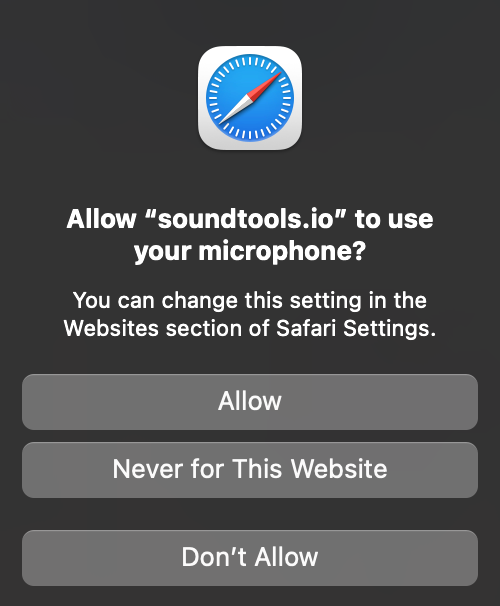
After clicking the button above, your browser will show a small popup asking to use your microphone. You must tap "Allow" for recording to work.
Click to choose a file or drag & drop here
MP3, WAV, M4A, FLAC, OGG, AAC
About This Voice to Instrument Tool
SoundTools.io Voice to Instrument is a free AI-powered tool that converts your voice into realistic instrument sounds. Hum, sing, or whistle a melody into your microphone (or upload a recording), choose from 7 instruments including piano, guitar, cello, and saxophone, and hear your melody played back as that instrument — instantly, entirely in your browser.
The tool uses AI-powered pitch detection to analyze your vocal melody, extract the exact notes and timing, and re-synthesize the performance using high-quality instrument samples. The same proven pitch detection algorithm that powers our Vocal Tuner tool extracts your melody with sub-semitone accuracy, then renders the notes through multi-sampled instruments for realistic playback.
Unlike competitors like Musicfy, Kits.AI, or Recordlabel.ai — which require accounts, charge money, and upload your audio to their servers — SoundTools.io Voice to Instrument runs 100% in your browser. Your voice recording is never sent anywhere. The processing takes about 2 seconds. There are no limits on usage and no account required.
What Powers This Tool
When you hum, sing, or whistle, SoundTools analyzes your recording with YIN, a fundamental-frequency estimation algorithm published by Alain de Cheveigné and Hideki Kawahara in the Journal of the Acoustical Society of America (2002). YIN tracks the pitch of your voice frame by frame and remains one of the most reliable pitch detectors for both speech and music — it handles high-pitched voices and wide frequency ranges that simpler autocorrelation methods get wrong. The detected pitches are quantized to the nearest musical note, which is why your melody comes back in tune even if your humming wasn't.
Those notes are then re-synthesized through Tone.js, an open-source Web Audio framework, using high-quality sampled instruments — piano, acoustic guitar, cello, saxophone, harmonium, organ, and synth pad. Both the pitch analysis and the synthesis run entirely in your browser, so your voice recording never leaves your device.
How to Convert Your Voice to an Instrument
- Choose your instrument: Select Piano, Guitar, Cello, Saxophone, Harmonium, Organ, or Synth Pad from the instrument grid. You can switch instruments after converting without re-recording.
- Record or upload: Click "Start Recording" and hum, sing, or whistle a clear melody. Or click "Upload File" to use an existing recording. For best results, use a single voice in a quiet environment.
- Convert and listen: Click "Convert" and hear your melody played as the selected instrument in about 2 seconds. Use the Original / Instrument toggle to compare your voice with the instrument version.
- Repeat and download: Use the loop control to repeat the melody multiple times. Download the finished audio as a WAV file, or export the melody as a MIDI (.mid) file to open in any DAW — MuseScore, GarageBand, Ableton, FL Studio, Logic — where you can change the instrument, edit notes, or quantize to a grid.
How SoundTools.io Voice to Instrument Compares
This is a genuinely niche category — most "voice to instrument" tools are actually AI cover generators (they convert your singing to sound like a specific artist, not an instrument). True voice-to-instrument tools are rare. The closest named competitors are Google's Tone Transfer experiment and Musicfy. Tone Transfer is free and browser-based like SoundTools, but only offers 4 instruments, has no download option, and doesn't work on iOS. Musicfy is primarily an AI cover tool (voice-to-artist-style) rather than voice-to-instrument, requires an account, and uploads audio to servers. SoundTools offers 7 instruments, instant 2-second processing, both WAV audio download and MIDI export, loop control, and full mobile support — all free, all in the browser, nothing uploaded. The MIDI export in particular sets it apart: neither Tone Transfer nor the AI-cover tools give you the editable note data to take into a DAW.
| Feature | SoundTools.io | Musicfy | Kits.AI | Recordlabel.ai | Google Tone Transfer |
|---|---|---|---|---|---|
| Price | ✅ Completely free | ⚠️ Limited free | ⚠️ Limited free | ❌ $9.99/mo+ | ✅ Free |
| Account required | ✅ No | ❌ Yes | ❌ Yes | ❌ Yes | ✅ No |
| Runs in browser | ✅ 100% | ❌ Server-side | ❌ Server-side | ❌ Server-side | ✅ In-browser |
| Audio stays private | ✅ Never uploaded | ❌ Uploaded | ❌ Uploaded | ❌ Uploaded | ✅ Local |
| Instruments | 7 | 20+ | 15+ | 10+ | 4 only |
| Processing time | ~2 seconds | 15-60 seconds | 15 seconds | 10-30 seconds | 10-60 seconds |
| Mobile support | ✅ Full | ✅ | ✅ | ✅ | ❌ No iOS |
| Download size | 2-5 MB (samples) | N/A (server) | N/A (server) | N/A (server) | 50-200 MB (model) |
| MIDI export | ✅ Yes (.mid) | ❌ No | ❌ No | ❌ No | ❌ No |
Voice to Instrument Use Cases
Create TikTok & YouTube Shorts Content
Record yourself humming a melody, convert it to piano or guitar, and create a before/after transformation video. The "hum → instrument" format is inherently shareable and entertaining. Use the Original / Instrument toggle to create dramatic reveal moments.
Sketch Song Ideas Without an Instrument
Got a melody stuck in your head? Hum it into the tool and hear it as piano, guitar, or cello. Convert the same melody to multiple instruments to find the right sound for your song. Download the WAV, or better yet export the MIDI and import the editable notes straight into your DAW to re-voice, harmonize, or build a full arrangement around them.
Create Custom Background Music
Hum a simple jingle or theme and convert it to organ, synth, or piano. Use the loop feature to repeat the melody, then download the result as original background music for videos, podcasts, or presentations — it's original music you created, so there are no copyright concerns.
Learn About Music and Instruments
Hear how the same melody sounds on different instruments. Switch between piano, cello, saxophone, and guitar to understand how timbre changes the character of a melody. Great for music students and teachers exploring orchestration.
Make Music Without Playing an Instrument
If you can hum a tune, you can make music. No guitar, no piano, no years of practice required. Your voice is the instrument — the AI handles the rest.
Frequently Asked Questions
How do I turn my voice into an instrument online for free?
Choose an instrument (like Piano or Guitar), click "Start Recording", and hum, sing, or whistle a melody into your microphone. Click "Stop" when finished, then click "Convert". In about 2 seconds, you'll hear your melody played back as the selected instrument. Download it as WAV audio, or export a MIDI file to open in your DAW. Everything is free — no account, no limits.
What kind of input works best?
Clear, single-note melodies work best — humming, singing "la la la," or whistling. The tool detects one pitch at a time, so avoid singing harmony or chords. A quiet environment helps the pitch detection work accurately. You don't need to be a good singer — the tool corrects your pitch to the nearest note automatically.
Can I upload an existing recording?
Yes. Click "Upload File" and upload an MP3, WAV, M4A, or other audio file. For best results, use a recording of a single voice humming or singing without background music. If your recording has background music, try our Vocal Remover first to isolate the voice.
How many instruments are available?
The tool currently offers 7 instruments: Piano, Acoustic Guitar, Cello, Saxophone, Harmonium, Organ, and Synth Pad. You can switch between instruments instantly — your melody is analyzed once and can be played through any instrument without re-recording.
Does this upload my audio to a server?
No. All processing happens entirely in your browser using the Web Audio API and Tone.js. Your voice recording is never sent to any server. This makes SoundTools.io the most private voice-to-instrument tool available online.
Can I use the output in my music or videos?
Yes. The instrument audio you create is yours to use however you want — in songs, videos, podcasts, presentations, social media, or commercial projects. There are no watermarks, no attribution requirements, and no usage restrictions.
Does this work on iPhone and mobile?
Yes. Voice to Instrument works on all modern browsers including Safari on iPhone and iPad. The tool is lightweight (only 2-5 MB of instrument samples to load) and processes quickly, making it fully functional on mobile devices.
What if my humming is off-pitch?
The tool automatically snaps your pitch to the nearest musical note using real-time pitch correction, so even if your humming is slightly off-key, the instrument version plays the closest correct notes. You don't need perfect pitch — just hum the general shape of the melody and the tool handles the rest. To pitch-correct your actual singing voice instead, try our Vocal Tuner.
Why doesn't it sound exactly like a real person playing?
The tool converts your vocal pitch and timing to instrument notes, but a real musician adds articulation, dynamics, and playing technique that go beyond pitch alone. Think of the output as a faithful "MIDI rendition" of your melody — accurate notes and timing, played with quality instrument samples. For most use cases (sketching ideas, creating content, having fun), the results sound great.
Can I loop or repeat my melody?
Yes. Use the "Repeat melody" control to loop your converted melody up to 8 times. This is great for creating longer background music, practicing passages, or building repetitive patterns. Both the preview and download include the repeated melody.
Can I export my melody as a MIDI file?
Yes. After converting, click "Download MIDI (.mid)" to save your melody as a standard MIDI file. Unlike the WAV — which is finished audio — the MIDI file contains the editable note data (pitches, timing, and velocity), so you can open it in any DAW like GarageBand, Ableton, FL Studio, or Logic, or in notation software like MuseScore, and change the instrument, edit notes, transpose, or quantize. The MIDI reflects any changes you made in the note editor and any loop repeats you set. By default it's exported at a standard 120 BPM reference with note timing preserved exactly. And if you hummed along to a click, tick “I hummed to a click” in the download panel and enter your BPM — the file is then written on a real beat grid with your first note pinned to beat 1, so it lands aligned in your DAW and quantize snaps cleanly. In other words, this doubles as a browser-based hum-to-MIDI (voice-to-MIDI) converter.
What's the difference between the WAV and MIDI downloads?
The WAV is rendered audio — the actual sound of your chosen instrument playing the melody, ready to drop into a video or listen to as-is. The MIDI is the underlying performance data — which notes play, when, and how hard — with no sound baked in. Use the WAV when you want a finished audio clip; use the MIDI when you want to keep editing in music software, swap the instrument for a different sound library, or turn your melody into sheet music.
Is this a Google Tone Transfer alternative?
Yes, and a more capable one. Google Tone Transfer (a Magenta project) is the most direct functional equivalent — it converts hummed or sung melodies into instrument sounds in the browser. But Tone Transfer only offers 4 instruments (flute, trumpet, violin, and flute), doesn't work on iOS Safari, has no download option for your converted melody, and hasn't received updates in years. SoundTools Voice to Instrument offers 7 instruments, works on all devices including iPhone, includes WAV download, adds a loop/repeat control, and processes melodies in about 2 seconds. If you came here from Tone Transfer, this is the upgrade.
Is this a Musicfy alternative?
Partially — it depends what you're trying to do. Musicfy is primarily an AI cover generator that converts your singing to sound like a specific artist's voice (e.g., "sing this and hear it as Drake"). SoundTools Voice to Instrument converts your melody to sound like a musical instrument — piano, guitar, cello, and more. If you want to hear your voice converted to an instrument sound, SoundTools is the right tool. If you want to hear your voice converted to sound like a specific recording artist, Musicfy does that (with an account and credit limits). The tools serve different creative goals, but both start from the same premise: sing something, hear it transformed.