Speak, say anything, or read a sentence — our AI pitch correction snaps every syllable to musical notes while a generated backing track of drums, bass, and chords plays underneath. The result is a catchy, pitch-perfect song made from your own voice. Choose a genre, record, and hit Create Song. Everything runs inside your browser using the Web Audio API — nothing is uploaded to any server.
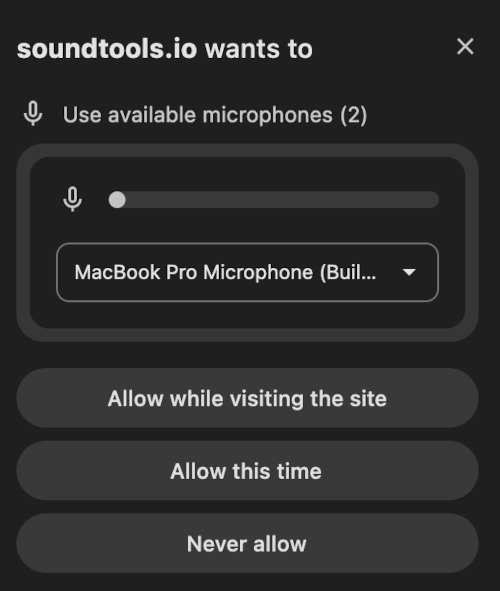
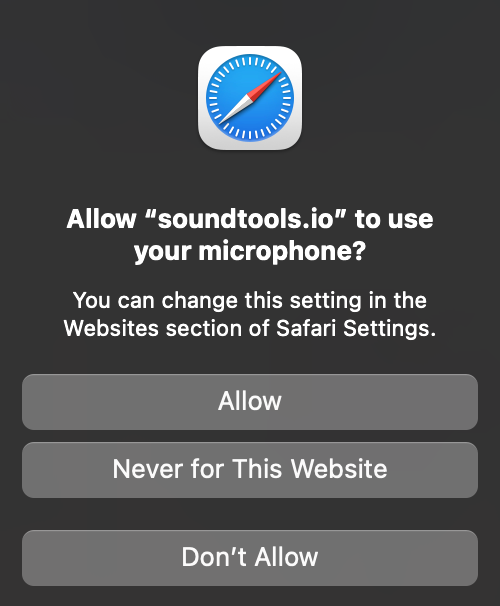
After clicking the record button, your browser will show a popup asking to use your microphone. You must tap "Allow" for recording to work.
Click to choose a file or drag & drop here
WAV, MP3, M4A, OGG, FLAC, WebM, AAC • For best results, upload a clear recording of someone speaking
About This Speech to Song Tool
SoundTools Speech to Song is a free AI-powered tool that transforms ordinary speech into a catchy song. It works entirely in your browser — no downloads, no accounts, no server uploads. You speak into your microphone (or upload an audio file), choose a musical genre, and the tool applies professional-grade pitch correction to snap your voice to musical notes while generating a matching beat with drums, bass, and chords. The result is a fun, shareable song made from your own voice and words.
The technology combines three proven audio processing techniques: YIN pitch detection identifies the pitch of every syllable in your speech, a phase vocoder shifts each syllable to the nearest note in your chosen musical key and scale, and a backing track generator creates drums, chords, and bass in your selected genre. The entire pipeline runs in about 2-5 seconds using the Web Audio API and OfflineAudioContext — no external servers or AI models required.
How to Turn Your Speech into a Song
- Pick a genre: Choose from Trap, Drill, UK Drill, Sexy Drill, Melodic Rap, Cloud Rap, Conscious, Mumble Rap, Pop Rap, Country Trap, Tech House, Melodic Techno, Hard Techno, Afro House, Speed Garage, Drum & Bass, Afro Tech, Hard Dance, Deep House, Amapiano, Hip-Hop, EDM, Reggaeton, Pop, Rock, Lo-Fi, Country or R&B. Each genre sets the tempo, drum pattern, chord progression, and bass style.
- Set the key (optional): Leave on "Auto ✨" to let the tool detect the best key from your voice, or manually select a specific key (C through B).
- Record or upload: Click "Start Recording" and speak clearly for 5-20 seconds. Say anything — a sentence, a joke, a birthday message, or nonsense. Alternatively, upload an audio file containing speech.
- Click Create Song: The tool processes your speech in 2-5 seconds. It pitch-corrects your voice, generates a backing track, and mixes everything into a song.
- Listen and download: Toggle between Original and Song to hear the transformation. Download the result as a WAV file to share.
How Speech to Song Works
The tool uses a three-stage audio processing pipeline, all running inside your browser. First, a YIN pitch detection algorithm analyzes your speech frame-by-frame (~every 11 milliseconds) to determine the pitch of each syllable. Unvoiced sounds like consonants (s, t, k, p) are detected and left unchanged. Second, a phase vocoder shifts each voiced frame to the nearest note in your selected key and musical scale — this is the same algorithm used in professional pitch-correction software, running at maximum retune speed for the iconic "T-Pain" effect. Third, a backing track is generated with drums (from classic drum machine samples), synthesized chords, and a bass line following the chord roots. Everything is mixed together with reverb on the vocals and dynamics compression for a polished final output.
What Makes This Different from Suno and Udio?
Suno, Udio, and similar AI music generators are text-to-song tools — you type lyrics and an AI generates a complete song with AI-generated vocals. SoundTools Speech to Song is speech-to-song — your actual, real voice becomes the song. You speak, and your own voice is pitch-corrected and placed over a beat. The magic is hearing yourself transformed, not hearing an AI-generated voice. This is the same concept that made Smule's app (#1 on iOS with 10M+ downloads) and the Gregory Brothers' "songified news" videos go viral — except it runs free in your browser with no app, no account, and no limits.
How SoundTools Speech to Song Compares
| Feature | SoundTools | Songify (Smule) | AutoRap (Smule) | Suno / Udio |
|---|---|---|---|---|
| Free | ✅ Completely free | ⚠️ Freemium | ❌ $2.99/week | ⚠️ Limited free |
| No install required | ✅ Browser-based | ❌ Mobile app | ❌ Mobile app | ✅ Browser-based |
| Uses your real voice | ✅ | ✅ | ✅ | ❌ AI voice |
| No account required | ✅ | ❌ | ❌ | ❌ |
| Audio stays private | ✅ Never uploaded | ❌ Server-side | ❌ Server-side | ❌ Server-side |
| Multiple genres | ✅ 28 genres | ✅ Multiple | ✅ Multiple | ✅ Any genre |
| Export audio | ✅ WAV | ⚠️ In-app only | ⚠️ In-app only | ✅ MP3 |
| Desktop & mobile | ✅ Any browser | ❌ Mobile only | ❌ Mobile only | ✅ Desktop |
Use Cases
Turn Inside Jokes into Songs
Say your friend's most ridiculous quote into the mic, pick Trap or Hip-Hop, and hit Create Song. Send them the WAV file. Works brilliantly for birthday messages, group chats, and pranks.
Create Viral TikTok / Shorts Content
The "before/after" speech-to-song transformation is inherently entertaining content. Record your speech, show the original, then play the song version. The contrast is the content.
Prototype Rap Lyrics
Speak your lyrics naturally, choose Hip-Hop or Trap, and hear them over a beat with the T-Pain effect. It's a fast way to test flow and cadence before stepping into the booth.
Make Educational Content Memorable
Teachers and content creators: speak a fact, a vocabulary word, or a historical date, then transform it into a song. Information set to music is easier to remember — this is the "Schoolhouse Rock" principle.
Transform Voice Memos
Upload a voice memo (your own or a friend's), pick a genre, and turn it into a song. Works with voicemails, podcast clips, or any spoken audio recording.
Frequently Asked Questions
How do I turn my speech into a song online?
Pick a style (Trap, Drill, Tech House, etc.), click "Start Recording", say anything into your microphone for 5-20 seconds, then click "Create Song!". The tool pitch-corrects your voice and adds a beat, chords, and bass in about 2-5 seconds. Download the result as a WAV file. Everything is free, instant, and runs in your browser — no account or upload needed.
What is the speech-to-song illusion?
The speech-to-song illusion is a well-documented perceptual phenomenon in psychology where a spoken phrase, when repeated in a specific rhythmic pattern, begins to sound like it is being sung rather than spoken. This tool takes that concept further by applying actual pitch correction and adding a musical backing track, making the transformation explicit and shareable.
What should I say for the best result?
Anything works! The tool is designed to make any speech sound musical. Short sentences (5-15 seconds) tend to produce the best results. Speak clearly and with some energy — monotone whispers won't give the pitch detector much to work with. The more expressive your speech, the more melodic the result.
Can I switch genres after creating a song?
Yes. After creating your song, simply tap a different genre button. The button changes to "Remake as [Genre]" — click it to regenerate the song with the new genre's beat, tempo, chords, and bass. Your original speech audio is cached, so remaking is fast (~2 seconds).
Why does the pitch-correction effect sound so strong?
By design. Speech-to-song uses maximum retune speed (instant pitch correction) — the same "T-Pain" setting. This is what makes speech sound like singing. The aggressive correction snaps every pitch variation to a discrete musical note, creating the distinctive robotic-melodic effect. If you want subtle pitch correction without a beat, try our Vocal Tuner with a slower retune speed.
Does this upload my audio to a server?
No. All audio processing — pitch detection, pitch correction, beat generation, chord synthesis, bass synthesis, reverb, compression, and final mixing — happens entirely inside your browser using the Web Audio API. Your microphone input and uploaded files are processed on your device and are never sent to any server.
What browsers are supported?
The tool works in Chrome (desktop and Android), Firefox, Edge, Safari (desktop and iOS). It uses standard Web Audio API features (AudioContext, OfflineAudioContext, MediaRecorder) that are supported in all modern browsers.
Can I upload a file instead of recording?
Yes. Click the "Upload File" tab and upload any audio file containing speech (WAV, MP3, M4A, OGG, FLAC, WebM, AAC). For best results, upload a clear recording of someone speaking. Maximum recommended length is 30 seconds.
How long should my speech be?
The sweet spot is 5-20 seconds. Minimum 2 seconds (shorter than 3 seconds may produce thin results). Maximum 30 seconds — this keeps processing fast. The tool enforces these limits during recording.
Is this a Songify alternative?
Yes. Smule's Songify app popularized the concept of turning speech into song, but it requires a mobile app download and an account. SoundTools Speech to Song does the same thing — and more — entirely free in your browser. No app, no account, no upload. You get 28 genre styles (vs. Songify's limited selection), real-time voice effects like reverb, delay, and distortion, 8 classic drum kits, 10 synth pads, and a downloadable WAV file. If you're looking for a free Songify alternative that works on desktop and mobile without installing anything, this is it.